So I've spent the majority of this week in Seattle at the OWASP conference. The conference was great. Lots of great talks (the .NET stuff in particular) and lots of great discussion. The best part of the whole thing was the big picture thinking and debating about a solution to the app sec problem. The creation of tools that would prevent (or make it much more difficult) for developers to write security bugs is certainly an interesting idea; one that I think is feasible for a lot of technical type bugs. For example, preventing SQL injection would be as simple as forcing developers to use a framework that only allowed database querying through parameterized queries. Logic bugs, however, and user problems are a different story. I think most of the work on this area will revolve around the software frameworks and operating systems limiting the amount of damage these other types of bugs can do. I'm definitely joining OWASP...
I didn't much care for Seattle though. It was my first, and probably last, time there. The weather sucked, lots of homeless people downtown, the bars closed early on weekdays and the weather really sucked. Well, one day the weather was ok. Anyhow, I did get to visit the original Pike's Place Starbucks which made my wife jealous (she manages an SBUX in Wisconsin). I did bring her back some merch with the original logo (the tit exposed logo).
Friday, October 20, 2006


Tuesday, April 11, 2006
An Advanced Guide to Avoiding Identity Theft
This is meant to be a more complete guide to avoiding identity theft than those that are currently available online. I wanted to include some information that those who aren't clueless might find useful and to perhaps stimulate some interesting conversation.
To begin I would like to distinguish between identity theft and transactional credit fraud. Having your credit card or bank account number used to make a purchase is known as transactional credit fraud whereas using personal information (name, social security number, address, etc...) to establish new accounts in another's name is identity theft. These are both commonly lumped together as identity theft but they are different. The following information will help you defend against both.
For the rest of this article I will use the term "attacker" to indicate the bad guy that is going to steal someone's identity or commit credit fraud and I will use the term "victim" to indicate, well, the victim.
Both identity theft and transactional credit fraud originate when an attacker obtains sensitive information about a victim. This information can include (but is certainly not limited to) name, address, family member's names, credit card numbers, bank name, bank account number, bank account routing number, mother's maiden name, social security number (social insurance number for you Canadians), driver's license number, your pet's names, etc... You get the idea. There are many different ways that this information can be obtained and minimizing the potential of these ways is the focus of the rest of this article.
Online Activity:
First and foremost, keep your operating system and software up to date. Patch as soon as patches become available. Update your antivirus daily (most can be set up to do this automatically). Use a desktop firewall if you don't have a hardware firewall in place. Keep spyware off your machine. Failing to do any of this makes it easier for various types of scum-ware to make themselves at home on your machine and have free-reign on information you've stored there or process there.
References:
AVG - A free anti-virus
Windows Update
Ad Aware SE Personal - A free spyware removal tool
Online Accounts:
For those of us that have lots of online accounts, creating strong passwords that are different for every site is difficult but very important. Your bank spent a lot of time and effort creating a hashed web application login to protect your account information, you shouldn't destroy their efforts by using the same password for every stupid web forum and website that requires a login (most of which didn't spend two seconds thinking about security). There are tools available that allow you to store your passwords in a secure forum so you don't have to remember them all. The one I use is Just1Key. Information for all of my accounts is stored encrypted on their servers and I only have to remember one passphrase to access them all. Since I only have to remember the one passphrase I can make it very long and secure and I can change it frequently. Another product is Password Safe which was created by security expert Bruce Schneier. Password Safe is free, Just1key is not but it lets me access all of my account information from any computer with an internet connection. Here is a website that will help you generate strong random passwords that you can use for all of your accounts once you're comfortable with a password management solution.
A final thing to mention about securing online accounts is the use of secret questions. The correct way for a web application to use a secret question is to use it as a trigger to initiate a password reset sequence. It should not be accepted as an alternate to a password, it should only send an email to the user, at their registered email address, with information on how to reset their password. The problem is that many secret questions have answers which are easily discovered. Also, the keyspace for the questions is usually fairly small. What is your mother's maiden name? Think of the most common American surnames. What is your pet's name? Think of the most common pet names. What city were you born in? Think of the largest cities. The secret question should only be used to prevent abuse of the password reset feature of a web application. I routinely fill in garbage into these questions.
Shopping Online:
Merchants who accept credit cards are in violation of the payment card industry's (PCI) data security standard if they store credit card numbers in a readable form in their databases. There is little doubt that a lot of merchants do store credit card numbers unencrypted (think of all the news stories where credit card numbers were stolen). Because of this, do not use the "store my credit card number" feature of a web application if it is available. Use single-use account numbers if your credit card supports it. I can generate a single-use number that expires in two months and that has a spending limit just higher than my intended purchase.
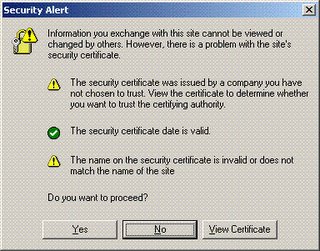
Whenever submitting personal information check your browser to see if the web traffic you're about to submit is encrypted. While browser dependent you will usually see a lock icon somewhere near the bottom of the browser. Additionally, the url will be prefixed with https (http over ssl). Seeing these two things let you know that the web site traffic is encrypted with SSL (so the casual snoop or packet sniffing cannot view your personal information). Beware, however, if these sites come with a certificate warning. A certificate warning means that something is wrong with the certificate that web site is issuing. This is a problem because it could indicate that someone is attempting to stage a man-in-the-middle attack. If your web traffic is going through a hackers machine and he tricks you into accepting his certificate, then all the traffic will be encrypted with a certificate that the attacker has the private key for. This would allow the attacker to decrypt any information encrypted with it. This is what the certificate warning looks like in Internet Explorer:
Shopping Offline:
A newer threat has surfaced whereby an attacker uses a cell phone with a camera to snap a photo of a credit card number when it is exposed. Because of this, when using a credit card in a public place take care to cover the number as much as possible. Cover the number with your finger when you take it out of your wallet or purse and hand it to the cashier. Don't set it on the counter or wave it around.
Don't sign the back of your credit card, instead write "SEE ID" on it. When cashiers check the signature on the back of the card you will have to provide your ID to them. In the event that your credit card is stolen or lost it will be more difficult for an attacker to use the card in a public setting (unless, of course, he also got your ID). I do this on all of my credit cards and while cashiers only ask for my ID about 30% of the time I don't mind giving it to them.
When using checks don't put your social security number or driver's license number on your checks. There is no reason for them to be on there and the few merchants that want your driver's license number can write it on the check themselves.
Personal Information:
Be suspicious of anyone asking for personal information over the phone, through email, in person, or on a form. This includes, your name (they're calling you, they should know that right), account numbers, routing numbers, PIN's, social security number, driver's license number, your birthday, your mother's maiden name or your dog's name. By default, if you don't initiate the communication I would refuse to give any of this information unless they can prove to you they're who they say they are. It would be a good idea to call the "organization" back if they say they need information. Most scams of this type are very physiological in nature so it takes the proper mindset to get used to avoiding these types of situations.
Get a decent paper shredder and shred anything with your name on it. Dumpster divers can discover a wealth of information about most people just from their junk mail. An attacker might learn enough to convince you they're who they say they are when they call asking for personal information.
Monitoring:
Obtain your credit report. The Fair and Accurate Credit Transactions Act of 2003 allows every American to obtain their credit report free once per year. You can check the report for mistakes or for accounts that you didn't open.
If you feel you have been a victim, close any accounts as soon as possible. Report the fraud to the three major credit bureaus Equifax, Experian, and TransUnion. You can file a complaint with the FTC using their online form.
References / More Information:
http://www.washingtonpost.com/wp-dyn/articles/A40992-2003Oct17.html
http://www.whitehouse.gov/news/releases/2003/12/20031204-3.html
http://www.usdoj.gov/criminal/fraud/idtheft.html
http://www.consumer.gov/idtheft/
To begin I would like to distinguish between identity theft and transactional credit fraud. Having your credit card or bank account number used to make a purchase is known as transactional credit fraud whereas using personal information (name, social security number, address, etc...) to establish new accounts in another's name is identity theft. These are both commonly lumped together as identity theft but they are different. The following information will help you defend against both.
For the rest of this article I will use the term "attacker" to indicate the bad guy that is going to steal someone's identity or commit credit fraud and I will use the term "victim" to indicate, well, the victim.
Both identity theft and transactional credit fraud originate when an attacker obtains sensitive information about a victim. This information can include (but is certainly not limited to) name, address, family member's names, credit card numbers, bank name, bank account number, bank account routing number, mother's maiden name, social security number (social insurance number for you Canadians), driver's license number, your pet's names, etc... You get the idea. There are many different ways that this information can be obtained and minimizing the potential of these ways is the focus of the rest of this article.
Online Activity:
First and foremost, keep your operating system and software up to date. Patch as soon as patches become available. Update your antivirus daily (most can be set up to do this automatically). Use a desktop firewall if you don't have a hardware firewall in place. Keep spyware off your machine. Failing to do any of this makes it easier for various types of scum-ware to make themselves at home on your machine and have free-reign on information you've stored there or process there.
References:
AVG - A free anti-virus
Windows Update
Ad Aware SE Personal - A free spyware removal tool
Online Accounts:
For those of us that have lots of online accounts, creating strong passwords that are different for every site is difficult but very important. Your bank spent a lot of time and effort creating a hashed web application login to protect your account information, you shouldn't destroy their efforts by using the same password for every stupid web forum and website that requires a login (most of which didn't spend two seconds thinking about security). There are tools available that allow you to store your passwords in a secure forum so you don't have to remember them all. The one I use is Just1Key. Information for all of my accounts is stored encrypted on their servers and I only have to remember one passphrase to access them all. Since I only have to remember the one passphrase I can make it very long and secure and I can change it frequently. Another product is Password Safe which was created by security expert Bruce Schneier. Password Safe is free, Just1key is not but it lets me access all of my account information from any computer with an internet connection. Here is a website that will help you generate strong random passwords that you can use for all of your accounts once you're comfortable with a password management solution.
A final thing to mention about securing online accounts is the use of secret questions. The correct way for a web application to use a secret question is to use it as a trigger to initiate a password reset sequence. It should not be accepted as an alternate to a password, it should only send an email to the user, at their registered email address, with information on how to reset their password. The problem is that many secret questions have answers which are easily discovered. Also, the keyspace for the questions is usually fairly small. What is your mother's maiden name? Think of the most common American surnames. What is your pet's name? Think of the most common pet names. What city were you born in? Think of the largest cities. The secret question should only be used to prevent abuse of the password reset feature of a web application. I routinely fill in garbage into these questions.
Shopping Online:
Merchants who accept credit cards are in violation of the payment card industry's (PCI) data security standard if they store credit card numbers in a readable form in their databases. There is little doubt that a lot of merchants do store credit card numbers unencrypted (think of all the news stories where credit card numbers were stolen). Because of this, do not use the "store my credit card number" feature of a web application if it is available. Use single-use account numbers if your credit card supports it. I can generate a single-use number that expires in two months and that has a spending limit just higher than my intended purchase.
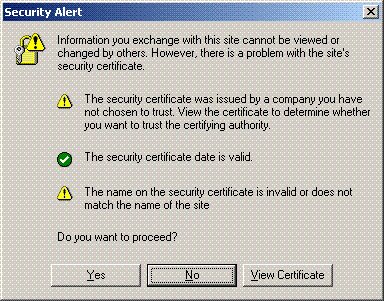
Whenever submitting personal information check your browser to see if the web traffic you're about to submit is encrypted. While browser dependent you will usually see a lock icon somewhere near the bottom of the browser. Additionally, the url will be prefixed with https (http over ssl). Seeing these two things let you know that the web site traffic is encrypted with SSL (so the casual snoop or packet sniffing cannot view your personal information). Beware, however, if these sites come with a certificate warning. A certificate warning means that something is wrong with the certificate that web site is issuing. This is a problem because it could indicate that someone is attempting to stage a man-in-the-middle attack. If your web traffic is going through a hackers machine and he tricks you into accepting his certificate, then all the traffic will be encrypted with a certificate that the attacker has the private key for. This would allow the attacker to decrypt any information encrypted with it. This is what the certificate warning looks like in Internet Explorer:
Shopping Offline:
A newer threat has surfaced whereby an attacker uses a cell phone with a camera to snap a photo of a credit card number when it is exposed. Because of this, when using a credit card in a public place take care to cover the number as much as possible. Cover the number with your finger when you take it out of your wallet or purse and hand it to the cashier. Don't set it on the counter or wave it around.
Don't sign the back of your credit card, instead write "SEE ID" on it. When cashiers check the signature on the back of the card you will have to provide your ID to them. In the event that your credit card is stolen or lost it will be more difficult for an attacker to use the card in a public setting (unless, of course, he also got your ID). I do this on all of my credit cards and while cashiers only ask for my ID about 30% of the time I don't mind giving it to them.
When using checks don't put your social security number or driver's license number on your checks. There is no reason for them to be on there and the few merchants that want your driver's license number can write it on the check themselves.
Personal Information:
Be suspicious of anyone asking for personal information over the phone, through email, in person, or on a form. This includes, your name (they're calling you, they should know that right), account numbers, routing numbers, PIN's, social security number, driver's license number, your birthday, your mother's maiden name or your dog's name. By default, if you don't initiate the communication I would refuse to give any of this information unless they can prove to you they're who they say they are. It would be a good idea to call the "organization" back if they say they need information. Most scams of this type are very physiological in nature so it takes the proper mindset to get used to avoiding these types of situations.
Get a decent paper shredder and shred anything with your name on it. Dumpster divers can discover a wealth of information about most people just from their junk mail. An attacker might learn enough to convince you they're who they say they are when they call asking for personal information.
Monitoring:
Obtain your credit report. The Fair and Accurate Credit Transactions Act of 2003 allows every American to obtain their credit report free once per year. You can check the report for mistakes or for accounts that you didn't open.
If you feel you have been a victim, close any accounts as soon as possible. Report the fraud to the three major credit bureaus Equifax, Experian, and TransUnion. You can file a complaint with the FTC using their online form.
References / More Information:
http://www.washingtonpost.com/wp-dyn/articles/A40992-2003Oct17.html
http://www.whitehouse.gov/news/releases/2003/12/20031204-3.html
http://www.usdoj.gov/criminal/fraud/idtheft.html
http://www.consumer.gov/idtheft/
Friday, February 17, 2006
Transform an Xbox into the ultimate media center (the complete guide)
This step-by-step guide (complete with pictures) that walks you through the steps how to easily soft-mod your Xbox. Don't throw away your old Xbox as it can still be converted into arguably the best media streamer on the market. Follow this guide to turn your virgin Xbox to a pimped out, play-anything-you-throw-at-it media monster.
read more | digg story
read more | digg story
Friday, February 10, 2006
Home Media Center Dilemma
I previously posted about possibly using an XBox with XBox media center on it, or building a Linux box to use MythTV on. Well, I decided that the primary feature that I want is the ability to record television. AFAIK, this is not possible using XBMC so that option is out. Also, the price of building a Linux box for MythTV will be far greater than if I were to just get a PVR from my television provider. Not the nerdiest solution but maybe I can hack up the PVR...
21 times more likely to get spyware with IE!
'In May and October, Levy and colleague Steven Gribble sent their crawlers to 45,000 Web sites, cataloged the executable files found, and tested malicious sites' effectiveness by exposing unpatched versions of Internet Explorer and Firefox to drive-by downloads." Here are their results...
read more | digg story
read more | digg story
Thursday, February 02, 2006
What to do when they ask for your Social Security Number..
Many people are concerned about the number of organizations asking for their Social Security Numbers. They worry about invasions of privacy and the oppressive feeling of being treated as just a number....
read more | digg story
read more | digg story
Wednesday, February 01, 2006
NMAP 4.0 Released
Nmap has undergone many substantial changes since the last major release (3.50 in February 2004) and they recommend that all current users upgrade.
read more | digg story
read more | digg story
Tuesday, January 31, 2006
HOWTO: Tunneling HTTP over SSH with DD-WRT, DynDNS and Putty
I thought I would write up a tutorial for tunneling HTTP over SSH as it is a great way to increase security and privacy of web surfing. I happen to work at a company that doesn't allow use of anonymous proxies (which is fine) but I don't necessarily want them viewing my web traffic either. Here is how I set up an HTTP tunnel to my home network from work.
My home setup consists of a Linksys WRT-54GL wireless access point connected to a high-bandwidth internet connection. The Linksys WRT-54GL is version 4 of the WRT-54G. With version 5 of the WRT-54G Linksys changed the hardware and stopped using Linux internally. Because of these changes the device could no longer run third-party firmwares. The WRT-54GL is Linksys' response to hobbyists (hackers) who still want to tinker with other firmwares. For this tutorial you'll need a router capable of running the DD-WRT firmware. This excellent firmware has many great features including an SSH daemon which is a prerequisite for our tunneling. A list of supported devices can be found here.
Instructions for flashing the firmware can be found all over the Internet. I'll assume the reader can flash the router and get the DD-WRT firmware running (Administration->Firmware Upload). Some Linksys routers (including the WRT-54GL) have a 3MB limit to firmware size so if that is the case use the mini version of DD-WRT first, once that is running upload the version you want.
I'm using DynDNS to keep tabs on my dynamic Internet IP address. This free service allows you to keep your changing IP address up to date and matched to a hostname. DD-WRT has support for automatically keeping the address updated. Other services are supported too so you can choose your favorite. Once your dynamic DNS account is created you can enter the relevant information into the Setup->DDNS tab in DD-WRT.
The next thing you will need to do is enable the SSH daemon. This can be done throughout the Administration->Services tab in DD-WRT. Under SSHD select enable. The login will be username:root password:[your router password].
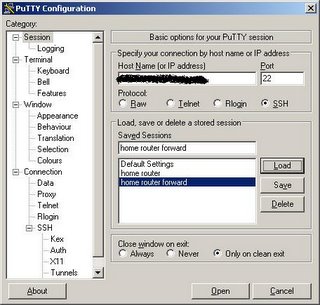
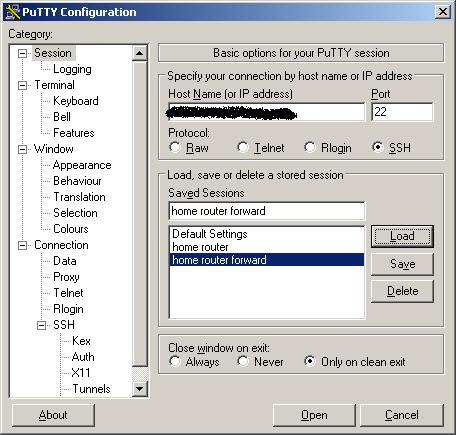
To connect to the SSH server and tunnel HTTP you will need the Putty SSH client. To connect to your router enter the hostname or IP address of your router on the Session tab:
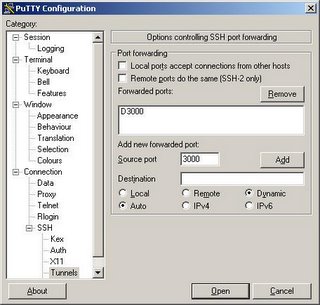
Next, to setup the tunnel click on Tunnels, enter 3000 (or whatever local port you'd like to use) for the source port, click Dynamic and click Add. This will create a SOCKS proxy on your local machine on port 3000 (or whatever port your chose) that you can use with your web browser.
Now you can click Open to log into your router. The tunnel isn't created until you log in. Remember that your username is root and your password is your router password (you changed it right?).
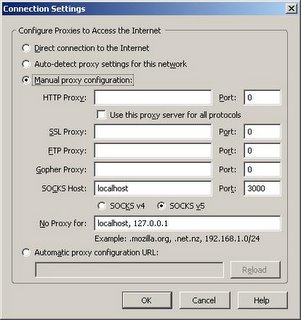
Now you're ready to connect your web browser. Using Firefox, you will have to configure a proxy server. Click Tools->Options. Then under General click Connection Settings. On this screen you can configure the SOCKS proxy that you've set up using Putty. Select Manual proxy configuration, enter localhost for the SOCKS host and 3000 for the port (or whatever you used). Click OK. You should now be tunneling through your home router over ssh.
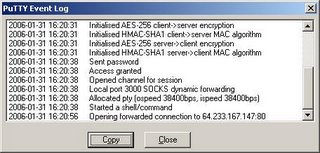
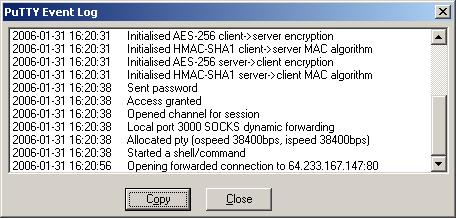
You can verify that the connections are being forwarded by looking at the Putty Event Log. You should see something similar to the following after loading www.google.com in your web browser.
My home setup consists of a Linksys WRT-54GL wireless access point connected to a high-bandwidth internet connection. The Linksys WRT-54GL is version 4 of the WRT-54G. With version 5 of the WRT-54G Linksys changed the hardware and stopped using Linux internally. Because of these changes the device could no longer run third-party firmwares. The WRT-54GL is Linksys' response to hobbyists (hackers) who still want to tinker with other firmwares. For this tutorial you'll need a router capable of running the DD-WRT firmware. This excellent firmware has many great features including an SSH daemon which is a prerequisite for our tunneling. A list of supported devices can be found here.
Instructions for flashing the firmware can be found all over the Internet. I'll assume the reader can flash the router and get the DD-WRT firmware running (Administration->Firmware Upload). Some Linksys routers (including the WRT-54GL) have a 3MB limit to firmware size so if that is the case use the mini version of DD-WRT first, once that is running upload the version you want.
I'm using DynDNS to keep tabs on my dynamic Internet IP address. This free service allows you to keep your changing IP address up to date and matched to a hostname. DD-WRT has support for automatically keeping the address updated. Other services are supported too so you can choose your favorite. Once your dynamic DNS account is created you can enter the relevant information into the Setup->DDNS tab in DD-WRT.
The next thing you will need to do is enable the SSH daemon. This can be done throughout the Administration->Services tab in DD-WRT. Under SSHD select enable. The login will be username:root password:[your router password]
To connect to the SSH server and tunnel HTTP you will need the Putty SSH client. To connect to your router enter the hostname or IP address of your router on the Session tab:
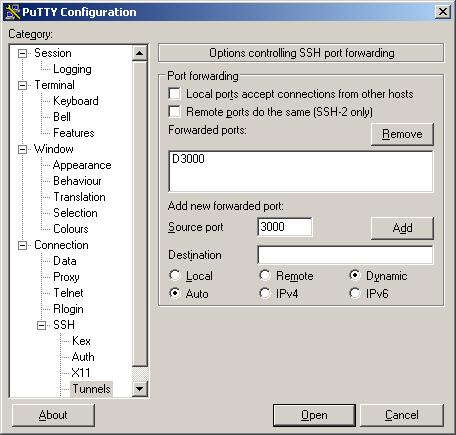
Next, to setup the tunnel click on Tunnels, enter 3000 (or whatever local port you'd like to use) for the source port, click Dynamic and click Add. This will create a SOCKS proxy on your local machine on port 3000 (or whatever port your chose) that you can use with your web browser.
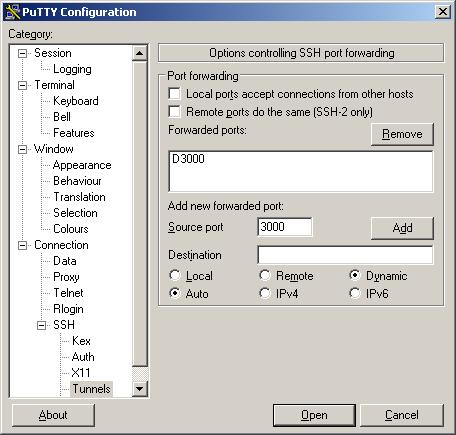
Now you can click Open to log into your router. The tunnel isn't created until you log in. Remember that your username is root and your password is your router password (you changed it right?).
Now you're ready to connect your web browser. Using Firefox, you will have to configure a proxy server. Click Tools->Options. Then under General click Connection Settings. On this screen you can configure the SOCKS proxy that you've set up using Putty. Select Manual proxy configuration, enter localhost for the SOCKS host and 3000 for the port (or whatever you used). Click OK. You should now be tunneling through your home router over ssh.

You can verify that the connections are being forwarded by looking at the Putty Event Log. You should see something similar to the following after loading www.google.com in your web browser.
Friday, January 27, 2006
Senators challenge Broadcast Flag!
This is excellent news...
After getting iPods of their own, some senators are questioning the motives behind the Broadcast Flag. Read on for the dettailed account...
read more | digg story
After getting iPods of their own, some senators are questioning the motives behind the Broadcast Flag. Read on for the dettailed account...
read more | digg story
I want a DaVinci Cryptex
For all you DaVinci Code fans out there this is really awesome. This site builds Cryptex's to custom orders. Some of these look really awesome! Check out the gallery on the website.
read more | digg story
read more | digg story
Promoting your blog and generating traffic?
How the heck to people promote their blogs. I'd like some tips in the comments please. I'm going to add it to my email signature I think. blah blah blah. whatever.
Thursday, January 26, 2006
XBox Media Center or MythTV HTPC???
So I've decided that I need a media center. I don't know how much use I would get out of it but as an engineer I need to build one. There are so many cool software packages to choose from (excluding Windows Media Center). Currently I'm torn between using a modified XBox to run XBox Media Center and a self-built Linux box running MythTV. For price reasons I will probably go with the XBox/XBox Media Center option. Of course, I could always install MythTV on an XBox running Linux. If anyone is actually reading this I would appreciate input. over and out...
Monday, January 09, 2006
IFIHADAHIFI, 1.6.2006 at Cactus Club Milwaukee
Happy Monday everybody (anyone?). I just wanted to drop a mention of a great band I saw (for the second time) last Friday at Cactus Club. They're called IFIHADAHIFI and are a great noise rock band from the Milwaukee area (although originally from Green Bay I think). I saw them back in ought-two opening for the Poster Children and they blew me away then. They are a fantastic live show, very energetic. Catch them if you can (the ladies might want to bring some earplugs). The opening band Bang Bang (from Chicago) was also worth checking out.
I'm also looking forward to the Life & Times show on Jan, 27. Life & Times is the current project of the former Shiner frontman Alan Epley. Here is a Pitchfork review of their latest called Suburban Hymns which I (unfortunately) have yet to hear. I guess I pick it up at the show.
I'm also looking forward to the Life & Times show on Jan, 27. Life & Times is the current project of the former Shiner frontman Alan Epley. Here is a Pitchfork review of their latest called Suburban Hymns which I (unfortunately) have yet to hear. I guess I pick it up at the show.
Tuesday, January 03, 2006
First Day Back
at work after the hollidays. I need to get back on a work schedule as I've been staying up too late and sleeping in a lot. I need some caffeine, good thing my wife is an assistant manager at Starbucks. Back to work...
Sunday, January 01, 2006
Pro-Co Rat Distortion Pedal Modification
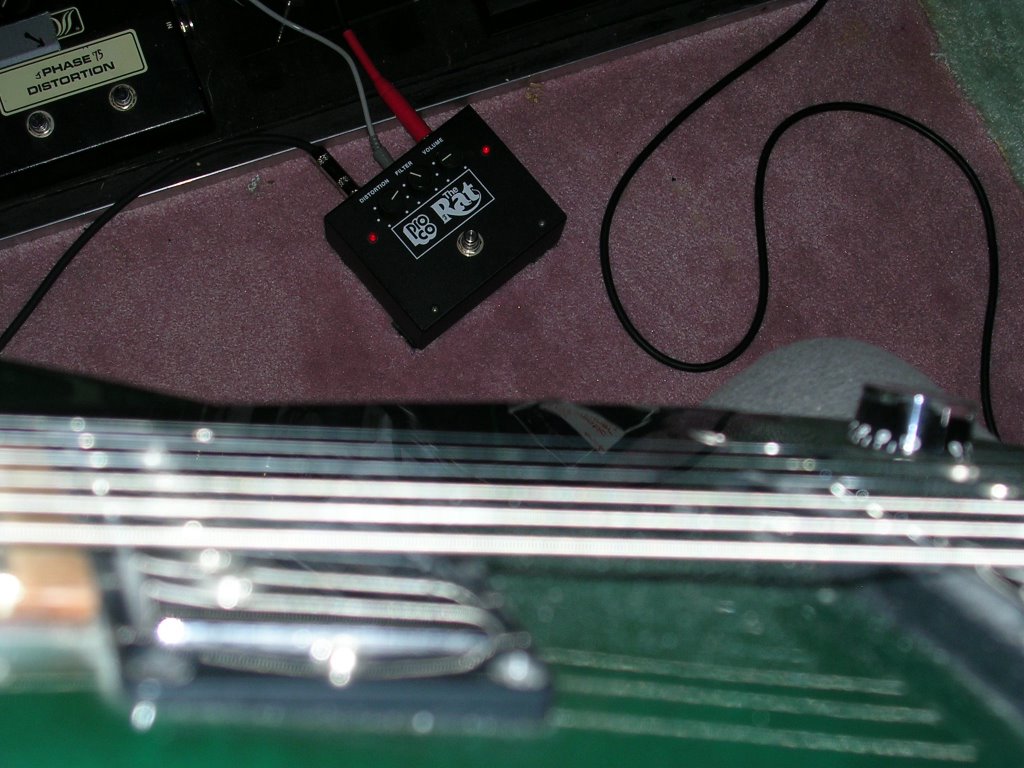
As a guitarist and an engineer I've always been facinated with guitar effects pedals. I've built my own and modified a bunch of them over the years. This is a recent modification to a Pro-Co Rat distortion pedal that I was quite pleased with.

The Rat is a great distortion pedal but one of my annoyances with it is that it doesn't have an LED (like most other pedals) to let you know when it is on. Yeah, if the distortion is turned up high you can tell but I often turned down the distortion and cranked the volume on this pedal to slam the input of my tube amp. Anyhow, this modification fixed the no-LED problem and made the output much hotter at the same time.
The Rat uses an operational amplifier (op-amp) in its distortion circuit. Two diodes are used in the feedback loop in parallel (and in opposite directions) to clip the signal at about 0.7 volts. LED's clip at a higher level (about 3.5 volts depending on type and color). So by replacing these feedback diodes with LED's the pedals output is much hotter (great for driving that tube amp). A side effect is that the LED's light up when the circuit is clipping. The brightness of the LED's is porportional to the amount of clipping. So when I did this I mounted the two feedback LED's on the case so I would know when the pedal is on (and have a cool light effect to boot). Here is another picture:


The Rat is a great distortion pedal but one of my annoyances with it is that it doesn't have an LED (like most other pedals) to let you know when it is on. Yeah, if the distortion is turned up high you can tell but I often turned down the distortion and cranked the volume on this pedal to slam the input of my tube amp. Anyhow, this modification fixed the no-LED problem and made the output much hotter at the same time.
The Rat uses an operational amplifier (op-amp) in its distortion circuit. Two diodes are used in the feedback loop in parallel (and in opposite directions) to clip the signal at about 0.7 volts. LED's clip at a higher level (about 3.5 volts depending on type and color). So by replacing these feedback diodes with LED's the pedals output is much hotter (great for driving that tube amp). A side effect is that the LED's light up when the circuit is clipping. The brightness of the LED's is porportional to the amount of clipping. So when I did this I mounted the two feedback LED's on the case so I would know when the pedal is on (and have a cool light effect to boot). Here is another picture:
How to Setup a Wi-Fi Hotspot
Creating a Wi-Fi Internet hotspot service from scratch can seem like a daunting task. I had many sleepless nights trying to get to grips with FreeRadius, DD-WRT, Chillispot etc. I hope that this How To helps you to avoid some of the problems I encountered along the way.
read more | digg story
read more | digg story
Happy New Years
I didn't make a new-year's resolution to create a blog. It just happened that way. I drank way too much last night (how common is that) but had a good time with my wife Kari at our friend Chuck's (somewhat) new house. I don't have any specific plans for this blog so it may get boring fast, or it may develop a theme as time goes on. I may post about my wife, our pets, information security (I'm a software security guy), music, weirdness or whatever.
It is sort of weird writing a first post knowing that most-likely no one will read it. Bye no-one.
It is sort of weird writing a first post knowing that most-likely no one will read it. Bye no-one.
Subscribe to:
Posts (Atom)