Monday, September 15, 2008

Guitar Effects Pedal Board - Ninja Style

Almost everyone uses Velcro to secure guitar effects pedals to their pedal boards and, until recently, I was no exception. Unfortunately, the Velcro on my board just wasn't sticking well anymore so I began looking for other options. The board itself was still very nice. It was constructed for me by my former bassist (who is now a carpenter for good reason) and I wanted to reuse the board. I stumbled across the following solution on the Internet somewhere so I cannot take credit for it. I just thought I would provide a write up and some pictures for anyone else who is tired of being oppressed by the tyranny of Velcro.

All you need to mount your pedals securely is a plank of wood (the pedal board itself), a bicycle chain, a bicycle chain repair tool, and some small wood screws. A drill also helps and I also used some cat5 data cable staples to clean up the job a bit.

The idea is to use links from a bicycle chain to mount the pedals securely to your pedal board. If you have the chain you will need to use the repair tool to break the links apart:It was difficult to use this cheap tool (about $5 at Wal Mart) to break the links apart so I assisted myself with a pair of vice grips which resulted in me breaking the tool:After going back to buy two more of the same tool I ended up with a pile of links:Once you have the links you need to attach them to the bottom of your pedals using the existing screws on the bottom of the pedals whenever possible:Then, screw them down to the board using the wood screws:Some pedals didn't have screws on the bottom (or the screws weren't close enough to the edge). On my (modified) Pro Co Rat and my Big Muff I needed to drill some holes then use some random small sheet metal screws I had laying around to attach the links:Here is the mostly finished board:I use a homemade power supply to power all my pedals as it was much cheaper than the commercial alternatives, just as good and fun to build. To keep all the wiring neat I used some cat5 data cable staples (and one NM cable staple) after I had everything routed how I wanted it:Rock on...

Friday, June 13, 2008

Improved Administration of AzMan with DSACLS

I've recently been working with Microsoft Authorization Manager (AzMan) using ADAM for storage. I became frustrated when I noticed that, for administration, AzMan only supports two roles: Administrators and Readers. In our particular implementation, we have a development tier (for application development) a QA tier (for QA testing) and a production tier (for, wait for it, production applications). The idea is that the applications can be defined on each tier and different folks can have access to various application features on the different tiers. For example, developers would have access to all application functions when running in development mode but not when running in production mode.

My desire was to set the development AzMan store so that the developers could create and configure their applications in development and then have their software released to various tiers. Unfortunately, by making them administrators at the store level, they can delete any configured application and delete the store itself. By making them readers they cannot create or configure new applications. It seemed like it was all or nothing here.

Fortunately, I figured out the permission scheme in the underlying ADAM directory service and was able to modify it exactly how I wanted through the use of the DSACLS.EXE program.

The permission set I wanted for developers was read and write and create applications but not delete applications or the authorization store. On our ADAM server, let's say there was an application partition called CN=AzManPartition that was to house our authorization store. By using ADAM ADSI Edit you can see that there is a CN=Roles,CN=AzManPartition container defined where the Administrators and Readers groups are defined. I created a new group here called CN=Developers that I was going to use to put the developers in. If you haven't used ADAM ADSI Edit before it is done like this:

Right-click on CN=Roles,CN=AzManPartition and select New->Object
Choose Group and click Next
Enter the name (in this case Developers) for the cn attribute
For the groupType enter -2147483646 (which denotes a user group)

To edit the membership of this group:

Right-click on CN=Developers,CN=Roles,CN=AzManPartition and select Properties
Find the "member" property and click Edit
Select "Add Windows Account" to add users or groups from Active Directory

One further thing, members of this Developers group will also need read access when we create the store so add the Developers group as a member of the Readers group:

Right-click on CN=Readers,CN=Roles,CN=AzManPartition and select Properties
Find the "member" property and click Edit
Select "Add ADAM Account"
Enter CN=Developers,CN=Roles,CN=AzManPartition and click OK

Now we can create our AzMan store. Run the AzMan snap-in and ensure you're in developer mode:

Right-click on "Authorization Manager" and click Options
Select Developer mode and click OK.

To create the new store:

Right-click on "Authorization Manager" and click "New Authorization Store"
Select "Active Directory"
For the store name enter: msldap://servername:port/CN=AzMan,CN=AzManPartition

Finally, to grant the required rights to developers open the ADAM Tools Command Prompt. I needed to grant Developers the generic read, generic write and create children permissions (not full control as making them administrators would have done). I did this with DSACLS.EXE as follows:

C:\WINDOWS\ADAM>dsacls.exe \\servername:port\CN=AzMan,CN=AzManPartition /I:T /G CN=Developers,CN=Roles,CN=AzManPartition:GR
C:\WINDOWS\ADAM>dsacls.exe \\servername:port\CN=AzMan,CN=AzManPartition /I:T /G CN=Developers,CN=Roles,CN=AzManPartition:GW
C:\WINDOWS\ADAM>dsacls.exe \\servername:port\CN=AzMan,CN=AzManPartition /I:T /G CN=Developers,CN=Roles,CN=AzManPartition:CC

Now developers can create and configure applications in AzMan but if they try to delete anything (or modify permissions) they are denied access.

More information on the different permission sets you can grant with DSACLS.EXE is available here: http://support.microsoft.com/kb/281146

Friday, May 02, 2008

Using AzMan with CSLA Business Objects

Using AzMan to provide authorization to your CSLA business objects is a relatively easy task. In the following examples I'm using AzMan through the Enterprise Library AzMan Authorization Provider. If you're using the COM API directly you should be able to modify the AzManPrincipal class below to wrap that instead of the EL provider.

First, I've created a class called AzManPrincipal which extends the Csla.Security.BusinessPrincipalBase class. This is the class that is an IPrincipal and as such has the implementaion of IsInRole. It is worth noting that my implementation below will authorize access on the "task" defined in AzMan.

internal sealed class AzManPrincipal : Csla.Security.BusinessPrincipalBase
{
private IAuthorizationProvider _authProv = null;
public AzManPrincipal(IIdentity identity)
: base(identity)
{
string providerName = ConfigurationManager.AppSettings["AzMan Provider"];
_authProv = AuthorizationFactory.GetAuthorizationProvider(providerName);
}
public override bool IsInRole(string role)
{
return (_authProv.Authorize(this, role));
}
}


Next, at the start of your application you will need to set your custom principal on the Csla.Application.User

Csla.ApplicationContext.User = new AzManPrincipal(WindowsIdentity.GetCurrent());


Finally, your classes may use the current application context to authorize any actions on the class (CRUD methods or read/write properties) as in the following example:

public static bool CanGetObject()
{
return (Csla.ApplicationContext.User.IsInRole("Read Customer Task"));
}

Monday, January 21, 2008

Something Idiotic That Almost Everyone Does

I've recently noticed that a lot of people, when waiting for water from a faucet to become warm, will turn the water on so that when it is up to temperature it will be the temperature that they want. When you do this, some of the water comes from the cold water line. This water is completely wasted. Also, since you're not pulling the maximum amount from the hot water line it is going to take longer to empty that line of room temperature water.

I'm not much of an environmentalist so I'm the last person that would be telling people to conserve water. I am, however, interested in making my life more efficient. So, when you want warm water turn it fully to the hot side until it warms up then adjust it. Water conservation is just a nice side-effect.

Monday, August 20, 2007

DirecTV HD-DVR (HR-20 700) Pixelation and Audio Dropout Diagnosis

If you're noticing audio drops and pixelation when watching live or recorded HD programs on your HR-20 this is how to diagnose the problem. I was having the problem on the MPEG-2 encoded HD channels (70-79) and it was annoyingly intermittent. At best it would happen every half-hour or so and at worst it would happen every few seconds.

The first thing to check is the signal strength (of course) but you have probably already done that. That wasn't my problem but if you haven't verified that the signal is ok do this:

Menu->Help & Settings->Setup->Sat & Ant->View Signal Strength->Signal Meters

You're looking for green on both Tuners. 75 or better. If you're not there then stop here. You'll probably need to adjust your satellite.

If your signal is ok, we'll next want to determine if the B-Band converters are causing the problem. These are the small boxes inline with the coax coming in from the satellite. Remove them and see if the problem goes away. If it does, your B-Band converters are bad. Call DirecTV and ask for new ones. They are free.

If removing the B-Band converters didn't solve the problem we need to determine if the problem is on one or both signal lines. Every time you change the channel the HR-20 switches tuners (unless something is being recorded on one tuner). Stop any recordings and turn to channel 75 (TNT-HD). Note whether you see pixelation or not. Press: channel up, channel up, and then dial in 75 again. This should put you back on channel 75 but on the other tuner. The first channel up puts us on 76 opposite tuner, the second channel up put us on 77 same tuner and the dial in of 75 puts on back on 75 with the opposite tuner.

If you noticed the problem on on tuner but not the other then we have to determine if it is the coax or the tuner itself. Disconnect tuner 2 on the back of the box. Tune to 75 and note whether you see pixelation or not. Disconnect the line into tuner 1 and put the line that was in tuner two into tuner 1. Tune to 75 again and note whether you see the problem. Repeat the process with tuner 2 trying each line in tuner 2.

If the problem occurs with both lines on one tuner, but not the other, then your tuner is shot. Hopefully your HR-20 is still under warranty. If the problem occurs on both tuners with one coax line but not the other, then the wiring is bad. Run a new cable.

Hopefully this will save a few people an expensive service trip.

Thursday, February 01, 2007

10 Guidelines for Becoming a More Secure Coder

The number of software developers that know nothing about security is staggering. In the coming years software security is going to become more and more important. I wrote these guidelines as a starting point for any developer that wants to learn how to write secure code. There are many types of software as there are many different programming languages. I tried to keep these guidelines as technology and language agnostic as possible.

1. Use a Safe Language / Development Framework

By using a type-safe language (like Java or any of the .NET languages) you can avoid a number of the classic security bugs (most notably buffer overflows). Non type-safe languages, like C and C++, allow the developer to decide how memory should be managed, accessed and interpreted. This is a complex task and is quite error-prone. If you insist on using a non type-safe language and want to do it securely, you will have a lot more research to do. Additionally, make use of sandboxed environments whenever possible to make sure that a security bug doesn’t have full access to the system that it is running on. For you .NET developers, this means not running with full-trust whenever possible. More on type-safety: http://en.wikipedia.org/wiki/Type_safety

2. Trust Nothing and Make No Assumptions

Data should not be trusted if it comes from an untrusted source (like a user). This goes for all input from web applications (all GET/POST parameters, HTTP headers, cookies, etc…), input from thick-clients, and files that get processed by your system (XML) to name a few sources. This type of data must be normalized and sanitized before using it in your system. Normalization (and we’re not talking about relational databases here) is the process of getting input into an expected form. Many software systems allow different character sets (Unicode, ASCII, UTF-8, etc…) and different encodings (hex encoding, URL encoding, HTML encoding, etc…). The data needs to be in normal form for the sanitation to be effective. Sanitation means cleaning the data of any potential unsafe characters. If you’re going to issue the data into an HTTP response stream you will need to HTML encode the data (Server.HtmlEncode in ASP, System.Web.HttpUtility.HtmlEncode in .NET) which will properly escape things like < and > with &lt; and &gt;

Make no assumptions about how your software will be used as it is an attacker’s job to find these assumptions and exploit them. Continuously ask yourself if you’ve made any assumptions about the code you’re writing. Don’t assume that because you haven’t provided a link on your website to moneyTransfer.aspx that an attacker won’t request it.

3. Embrace Least-Privilege

The concept of least-privilege means that any accounts should have the least amount of access necessary for the software to properly function. For example, if your software uses a database account to access data, that account should only have access to the data required by the application. The database account should not have access to entire databases or servers and if it only needs to read data it should only be able to read the data. This is important because if your software system does have a security vulnerability (perhaps one that allows access to data) you will have limited the surface area of any potential attack. The best an attacker could do is access or tamper with the data of that application, not all of the data on the server.

4. Don’t Store Passwords in a Recoverable Format

Passwords for things like web applications should not be stored anywhere (including a database) in readable text. There is no reason to store a readable password. The password should be hashed and the hash should be stored. A hash is a cryptographic function which is not reversible. At login time you would simply apply the hash function to the entered password and compare it to the hash in the database. If the password was correct the hashes should match. Historically, hashes like MD5 and SHA-1 have been used for this purpose. These hashes have been shown to have some security problems and while those problems don’t apply to this password hashing mechanism it is easier to use a newer, more-secure hashing algorithm than to explain to others why the vulnerabilities don’t apply. Select something like SHA-256, SHA-384 or SHA-512. More info on hash functions can be found here: http://en.wikipedia.org/wiki/Cryptographic_hash_function

5. Create and Enforce a Password Policy

It doesn’t make much sense to build a secure application if it is going to have hundreds or thousands of users with a password of “password.” Enforcing simple strength requirements on passwords can go a long way to protecting your application. You will have to determine what level of strength your application's passwords require. Some systems may only need to restrict dictionary words while other may wish to force users to select passwords with upper-case letters, lower-case letters, numbers and symbols. Alternatives to implementing strength requirements on passwords include locking out accounts after a small number of consecutive failed login attempts and expiring passwords after a certain length of time (say, 180 days).

6. Parameterize Your Data Access

SQL injection plagues many different types of software. With SQL injection an attacker provides input to your application that manipulates your intended SQL query. When a SQL injection is present an attacker can usually get information on your database schema and retrieve or edit data in the database. The easiest and most effective way to defend against SQL injection is to use a parameterized query (combined with stored procedures if they’re supported by your database engine). Never build SQL statements by concatenating strings together with user input. Check the documentation for the database access technology you’re using. Here is a link for ASP.NET developers with some examples: http://aspnet101.com/aspnet101/tutorials.aspx?id=1

7. Hide Your Errors

Error messages will not be understood by the common user but to an attacker they are a goldmine. Error messages can be used to gain information about the system and in some cases can be used to enumerate the contents of entire databases. Never display error information to the user.

8. Don’t Write Your Own Crypto

There are plenty of good choices available for cryptography. There is no need to spend time trying to write your own algorithm. The accepted algorithms have been tested and analyzed for years and it is likely that the folks that invented and tested the algorithms are smarter than you. Good choices include triple-DES or AES for symmetric encryption (with a password) and PGP or SSL/TLS for asymmetric encryption (public/private key).

9. Have Someone Else Test Your Code as an Attacker

Consider this: You have written some code and made it as secure as you know how to. You cannot possibly test for the problems you didn’t foresee. Having someone else do the security testing is much more beneficial than doing it yourself. Also, the tester should be testing the software like an attacker might. For example, they should try to access or tamper with data that they shouldn’t have access to.

10. Get Secure Coding Training

If you’re serious about becoming a secure software developer consider getting some formal training. The guidelines I’ve outlined here are a great starting point and by following them you will have an edge on most developers. As you progress in your career and the systems that you work on increase in size and importance it will become necessary to relate your security decisions to the business. More training can give you the details you need to effectively perform a business risk analysis and create an effective threat model.

Where to go for more information:

OWASP - A ton of information for web developers: http://www.owasp.org/

Great books:

Writing Secure Code, Second Edition
Hacking the Code

Sunday, January 21, 2007

Computers learn to parse natural human language

A company in Israel claims to have solved the problem of enabling computers to parse natural human language. Linguistic Agents says its "NanoSyntax" technology translates normative human language into a formal computer language, potentially improving search interfaces, application interfaces, text-message-based network APIs, and phone trees.

read more | digg story

Tuesday, December 12, 2006

Computers that digest the news to change trading

The information provider will make available today a tagged version of its news feed — which provides 8,000 news stories a day — to make them easier for computer-based trading systems to digest. It describes the effort as generating “machine-readable news”.

read more | digg story

Friday, October 20, 2006

I just got back from the OWASP AppSec conference in Seattle.

So I've spent the majority of this week in Seattle at the OWASP conference. The conference was great. Lots of great talks (the .NET stuff in particular) and lots of great discussion. The best part of the whole thing was the big picture thinking and debating about a solution to the app sec problem. The creation of tools that would prevent (or make it much more difficult) for developers to write security bugs is certainly an interesting idea; one that I think is feasible for a lot of technical type bugs. For example, preventing SQL injection would be as simple as forcing developers to use a framework that only allowed database querying through parameterized queries. Logic bugs, however, and user problems are a different story. I think most of the work on this area will revolve around the software frameworks and operating systems limiting the amount of damage these other types of bugs can do. I'm definitely joining OWASP...

I didn't much care for Seattle though. It was my first, and probably last, time there. The weather sucked, lots of homeless people downtown, the bars closed early on weekdays and the weather really sucked. Well, one day the weather was ok. Anyhow, I did get to visit the original Pike's Place Starbucks which made my wife jealous (she manages an SBUX in Wisconsin). I did bring her back some merch with the original logo (the tit exposed logo).

Tuesday, April 11, 2006

An Advanced Guide to Avoiding Identity Theft

This is meant to be a more complete guide to avoiding identity theft than those that are currently available online. I wanted to include some information that those who aren't clueless might find useful and to perhaps stimulate some interesting conversation.

To begin I would like to distinguish between identity theft and transactional credit fraud. Having your credit card or bank account number used to make a purchase is known as transactional credit fraud whereas using personal information (name, social security number, address, etc...) to establish new accounts in another's name is identity theft. These are both commonly lumped together as identity theft but they are different. The following information will help you defend against both.

For the rest of this article I will use the term "attacker" to indicate the bad guy that is going to steal someone's identity or commit credit fraud and I will use the term "victim" to indicate, well, the victim.

Both identity theft and transactional credit fraud originate when an attacker obtains sensitive information about a victim. This information can include (but is certainly not limited to) name, address, family member's names, credit card numbers, bank name, bank account number, bank account routing number, mother's maiden name, social security number (social insurance number for you Canadians), driver's license number, your pet's names, etc... You get the idea. There are many different ways that this information can be obtained and minimizing the potential of these ways is the focus of the rest of this article.

Online Activity:

First and foremost, keep your operating system and software up to date. Patch as soon as patches become available. Update your antivirus daily (most can be set up to do this automatically). Use a desktop firewall if you don't have a hardware firewall in place. Keep spyware off your machine. Failing to do any of this makes it easier for various types of scum-ware to make themselves at home on your machine and have free-reign on information you've stored there or process there.

References:

AVG - A free anti-virus
Windows Update
Ad Aware SE Personal - A free spyware removal tool

Online Accounts:

For those of us that have lots of online accounts, creating strong passwords that are different for every site is difficult but very important. Your bank spent a lot of time and effort creating a hashed web application login to protect your account information, you shouldn't destroy their efforts by using the same password for every stupid web forum and website that requires a login (most of which didn't spend two seconds thinking about security). There are tools available that allow you to store your passwords in a secure forum so you don't have to remember them all. The one I use is Just1Key. Information for all of my accounts is stored encrypted on their servers and I only have to remember one passphrase to access them all. Since I only have to remember the one passphrase I can make it very long and secure and I can change it frequently. Another product is Password Safe which was created by security expert Bruce Schneier. Password Safe is free, Just1key is not but it lets me access all of my account information from any computer with an internet connection. Here is a website that will help you generate strong random passwords that you can use for all of your accounts once you're comfortable with a password management solution.

A final thing to mention about securing online accounts is the use of secret questions. The correct way for a web application to use a secret question is to use it as a trigger to initiate a password reset sequence. It should not be accepted as an alternate to a password, it should only send an email to the user, at their registered email address, with information on how to reset their password. The problem is that many secret questions have answers which are easily discovered. Also, the keyspace for the questions is usually fairly small. What is your mother's maiden name? Think of the most common American surnames. What is your pet's name? Think of the most common pet names. What city were you born in? Think of the largest cities. The secret question should only be used to prevent abuse of the password reset feature of a web application. I routinely fill in garbage into these questions.

Shopping Online:

Merchants who accept credit cards are in violation of the payment card industry's (PCI) data security standard if they store credit card numbers in a readable form in their databases. There is little doubt that a lot of merchants do store credit card numbers unencrypted (think of all the news stories where credit card numbers were stolen). Because of this, do not use the "store my credit card number" feature of a web application if it is available. Use single-use account numbers if your credit card supports it. I can generate a single-use number that expires in two months and that has a spending limit just higher than my intended purchase.

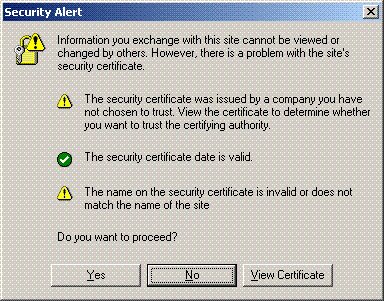
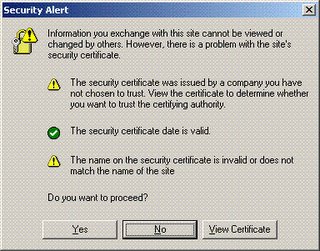
Whenever submitting personal information check your browser to see if the web traffic you're about to submit is encrypted. While browser dependent you will usually see a lock icon somewhere near the bottom of the browser. Additionally, the url will be prefixed with https (http over ssl). Seeing these two things let you know that the web site traffic is encrypted with SSL (so the casual snoop or packet sniffing cannot view your personal information). Beware, however, if these sites come with a certificate warning. A certificate warning means that something is wrong with the certificate that web site is issuing. This is a problem because it could indicate that someone is attempting to stage a man-in-the-middle attack. If your web traffic is going through a hackers machine and he tricks you into accepting his certificate, then all the traffic will be encrypted with a certificate that the attacker has the private key for. This would allow the attacker to decrypt any information encrypted with it. This is what the certificate warning looks like in Internet Explorer:


Shopping Offline:

A newer threat has surfaced whereby an attacker uses a cell phone with a camera to snap a photo of a credit card number when it is exposed. Because of this, when using a credit card in a public place take care to cover the number as much as possible. Cover the number with your finger when you take it out of your wallet or purse and hand it to the cashier. Don't set it on the counter or wave it around.

Don't sign the back of your credit card, instead write "SEE ID" on it. When cashiers check the signature on the back of the card you will have to provide your ID to them. In the event that your credit card is stolen or lost it will be more difficult for an attacker to use the card in a public setting (unless, of course, he also got your ID). I do this on all of my credit cards and while cashiers only ask for my ID about 30% of the time I don't mind giving it to them.

When using checks don't put your social security number or driver's license number on your checks. There is no reason for them to be on there and the few merchants that want your driver's license number can write it on the check themselves.

Personal Information:

Be suspicious of anyone asking for personal information over the phone, through email, in person, or on a form. This includes, your name (they're calling you, they should know that right), account numbers, routing numbers, PIN's, social security number, driver's license number, your birthday, your mother's maiden name or your dog's name. By default, if you don't initiate the communication I would refuse to give any of this information unless they can prove to you they're who they say they are. It would be a good idea to call the "organization" back if they say they need information. Most scams of this type are very physiological in nature so it takes the proper mindset to get used to avoiding these types of situations.

Get a decent paper shredder and shred anything with your name on it. Dumpster divers can discover a wealth of information about most people just from their junk mail. An attacker might learn enough to convince you they're who they say they are when they call asking for personal information.

Monitoring:

Obtain your credit report. The Fair and Accurate Credit Transactions Act of 2003 allows every American to obtain their credit report free once per year. You can check the report for mistakes or for accounts that you didn't open.

If you feel you have been a victim, close any accounts as soon as possible. Report the fraud to the three major credit bureaus Equifax, Experian, and TransUnion. You can file a complaint with the FTC using their online form.

References / More Information:

http://www.washingtonpost.com/wp-dyn/articles/A40992-2003Oct17.html

http://www.whitehouse.gov/news/releases/2003/12/20031204-3.html

http://www.usdoj.gov/criminal/fraud/idtheft.html

http://www.consumer.gov/idtheft/

Friday, February 17, 2006

Transform an Xbox into the ultimate media center (the complete guide)

This step-by-step guide (complete with pictures) that walks you through the steps how to easily soft-mod your Xbox. Don't throw away your old Xbox as it can still be converted into arguably the best media streamer on the market. Follow this guide to turn your virgin Xbox to a pimped out, play-anything-you-throw-at-it media monster.

read more | digg story

Friday, February 10, 2006

Home Media Center Dilemma

I previously posted about possibly using an XBox with XBox media center on it, or building a Linux box to use MythTV on. Well, I decided that the primary feature that I want is the ability to record television. AFAIK, this is not possible using XBMC so that option is out. Also, the price of building a Linux box for MythTV will be far greater than if I were to just get a PVR from my television provider. Not the nerdiest solution but maybe I can hack up the PVR...

21 times more likely to get spyware with IE!

'In May and October, Levy and colleague Steven Gribble sent their crawlers to 45,000 Web sites, cataloged the executable files found, and tested malicious sites' effectiveness by exposing unpatched versions of Internet Explorer and Firefox to drive-by downloads." Here are their results...

read more | digg story

Thursday, February 02, 2006

What to do when they ask for your Social Security Number..

Many people are concerned about the number of organizations asking for their Social Security Numbers. They worry about invasions of privacy and the oppressive feeling of being treated as just a number....

read more | digg story

Wednesday, February 01, 2006

NMAP 4.0 Released

Nmap has undergone many substantial changes since the last major release (3.50 in February 2004) and they recommend that all current users upgrade.

read more | digg story

Tuesday, January 31, 2006

HOWTO: Tunneling HTTP over SSH with DD-WRT, DynDNS and Putty

I thought I would write up a tutorial for tunneling HTTP over SSH as it is a great way to increase security and privacy of web surfing. I happen to work at a company that doesn't allow use of anonymous proxies (which is fine) but I don't necessarily want them viewing my web traffic either. Here is how I set up an HTTP tunnel to my home network from work.

My home setup consists of a Linksys WRT-54GL wireless access point connected to a high-bandwidth internet connection. The Linksys WRT-54GL is version 4 of the WRT-54G. With version 5 of the WRT-54G Linksys changed the hardware and stopped using Linux internally. Because of these changes the device could no longer run third-party firmwares. The WRT-54GL is Linksys' response to hobbyists (hackers) who still want to tinker with other firmwares. For this tutorial you'll need a router capable of running the DD-WRT firmware. This excellent firmware has many great features including an SSH daemon which is a prerequisite for our tunneling. A list of supported devices can be found here.

Instructions for flashing the firmware can be found all over the Internet. I'll assume the reader can flash the router and get the DD-WRT firmware running (Administration->Firmware Upload). Some Linksys routers (including the WRT-54GL) have a 3MB limit to firmware size so if that is the case use the mini version of DD-WRT first, once that is running upload the version you want.

I'm using DynDNS to keep tabs on my dynamic Internet IP address. This free service allows you to keep your changing IP address up to date and matched to a hostname. DD-WRT has support for automatically keeping the address updated. Other services are supported too so you can choose your favorite. Once your dynamic DNS account is created you can enter the relevant information into the Setup->DDNS tab in DD-WRT.

The next thing you will need to do is enable the SSH daemon. This can be done throughout the Administration->Services tab in DD-WRT. Under SSHD select enable. The login will be username:root password:[your router password].

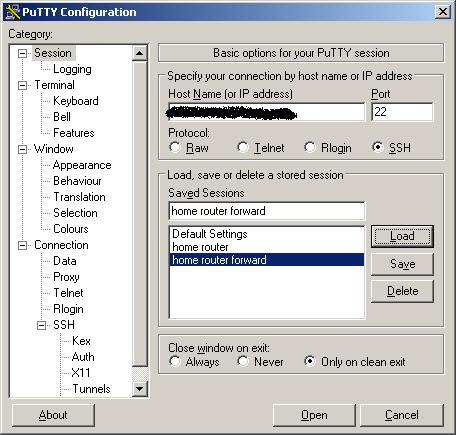
To connect to the SSH server and tunnel HTTP you will need the Putty SSH client. To connect to your router enter the hostname or IP address of your router on the Session tab:


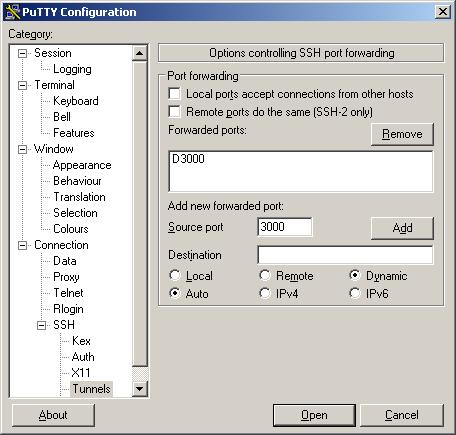
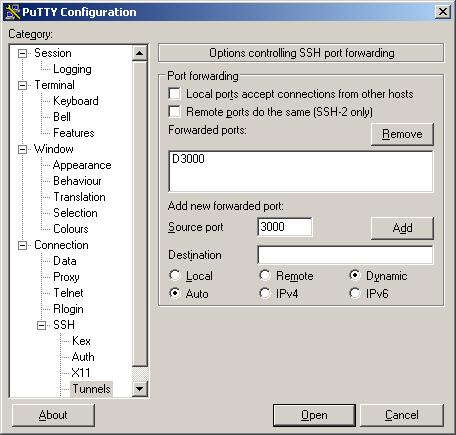
Next, to setup the tunnel click on Tunnels, enter 3000 (or whatever local port you'd like to use) for the source port, click Dynamic and click Add. This will create a SOCKS proxy on your local machine on port 3000 (or whatever port your chose) that you can use with your web browser.


Now you can click Open to log into your router. The tunnel isn't created until you log in. Remember that your username is root and your password is your router password (you changed it right?).

Now you're ready to connect your web browser. Using Firefox, you will have to configure a proxy server. Click Tools->Options. Then under General click Connection Settings. On this screen you can configure the SOCKS proxy that you've set up using Putty. Select Manual proxy configuration, enter localhost for the SOCKS host and 3000 for the port (or whatever you used). Click OK. You should now be tunneling through your home router over ssh.


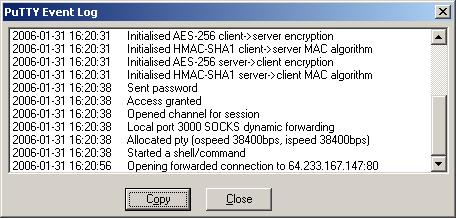
You can verify that the connections are being forwarded by looking at the Putty Event Log. You should see something similar to the following after loading www.google.com in your web browser.

Friday, January 27, 2006

Senators challenge Broadcast Flag!

This is excellent news...

After getting iPods of their own, some senators are questioning the motives behind the Broadcast Flag. Read on for the dettailed account...

read more | digg story

I want a DaVinci Cryptex

For all you DaVinci Code fans out there this is really awesome. This site builds Cryptex's to custom orders. Some of these look really awesome! Check out the gallery on the website.

read more | digg story

Promoting your blog and generating traffic?

How the heck to people promote their blogs. I'd like some tips in the comments please. I'm going to add it to my email signature I think. blah blah blah. whatever.

Thursday, January 26, 2006

XBox Media Center or MythTV HTPC???

So I've decided that I need a media center. I don't know how much use I would get out of it but as an engineer I need to build one. There are so many cool software packages to choose from (excluding Windows Media Center). Currently I'm torn between using a modified XBox to run XBox Media Center and a self-built Linux box running MythTV. For price reasons I will probably go with the XBox/XBox Media Center option. Of course, I could always install MythTV on an XBox running Linux. If anyone is actually reading this I would appreciate input. over and out...